Start Here
Welcome
This manual covers all of BigWave. It explains what each screen does, and it walks through setting up a company from an empty database to running work every day.
How the manual is organized
- Start Here: introduces the example company used in every chapter, then walks you through your first work order in about thirty minutes.
- Part 1: Understand BigWave covers the mental model. What a customer, site, project and work order are, how the screens are laid out, who sees what.
- Part 2: Set Up Your Company is the onboarding playbook: company profile, users, statuses, customers, projects, custom fields, rates, templates, alerts, customer portals. Work through chapters 5 to 9 in order. The rest you can read as you need them.
- Part 3: Run Your Operation covers the daily work. Dispatch, field technicians, quoting, invoicing, assets and recurring maintenance, partners, large rollouts, reporting.
- Part 4: Reference is for looking things up: import and export types, a screen-by-screen index, merge field codes, a glossary.
Who each part is for
| Role | Read this |
|---|---|
| Owner / admin | Everything, but especially Parts 1 and 2 |
| Office manager / dispatcher | Part 1, then chapters 8, 15, 16, 18, 19 |
| Technician | Chapters 2, 15, and 17 |
| Bookkeeper | Chapters 11, 18, 19, and 23 |
| Customer or partner using the portal | Chapter 14 |
Role notes show up inside chapters wherever something applies to one audience only. They look like this:
Role note: Technicians see a trimmed-down version of this screen. Details in chapter 17.
Conventions
One example company, everywhere. Every walkthrough uses Beacon Electric, a twelve-person electrical contractor. Beacon has a mixture of commercial and residential customers. Many of the commercial customers have multiple locations. This manual focuses on two of these customers:
Commercial (Harbor Grill): a multi-site contract customer.
Residential (the Okafors): a homeowner.
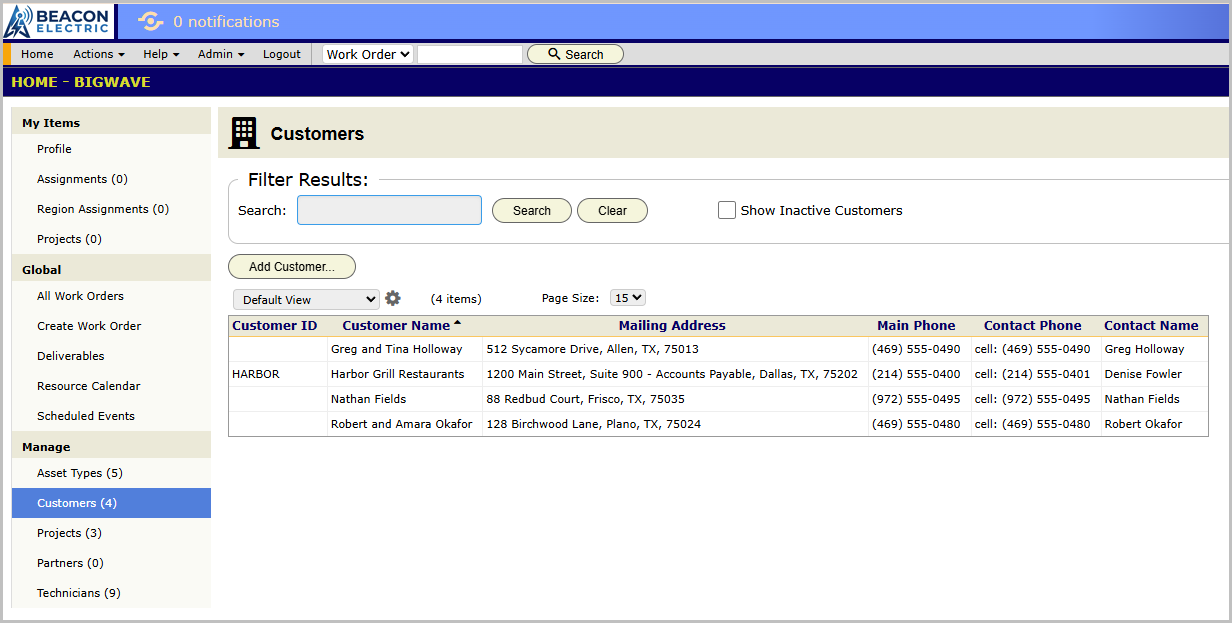
Screen names are written the way they appear in the product. When the manual says open Setup, it means the Setup screen under the Actions menu. A full path is spelled out like this: Home/Manage/Customers or Actions Menu/Setup.
One naming note before you start. Putting a technician on a work order for Tuesday is assigning, or dispatching, done on the resource calendar. Asset Scheduling is the engine that generates recurring maintenance work orders by itself, with no dispatcher involved. Chapter 16 covers the first. Chapter 20 covers the second.